

03-04-2026
How to Get a Copy of My IRS 2290 Form? A Simple Guide for First-Time Filers


Losing your HVUT paperwork happens more often than people admit, and it usually becomes urgent at the worst moment: IRP truck registration renewal, a new plate, a permit service asking for proof, or a carrier compliance check.
The good news is that getting a copy is usually simple once you know which document you need and where it lives. This guide breaks down how to get a copy of my IRS 2290 form (and the even more important proof document that most agencies actually want), with practical timelines, common roadblocks, and a clean recordkeeping strategy for first-time filers.
First, confirm what you’re really trying to replace: Form 2290 vs. Schedule 1
Most first-time filers search for a “copy of my 2290,” but IRP offices and DMVs almost always ask for Form 2290 Schedule 1, not the full Form 2290 return.
- Form 2290 is the tax return you file to report and pay Heavy Vehicle Use Tax (HVUT).
- Schedule 1 (Form 2290) is the IRS-stamped proof of filing/payment (or suspension) that lists each vehicle identification number (VIN).
If you are dealing with Form 2290 and IRP registration, Schedule 1 is the document that keeps your registration moving.
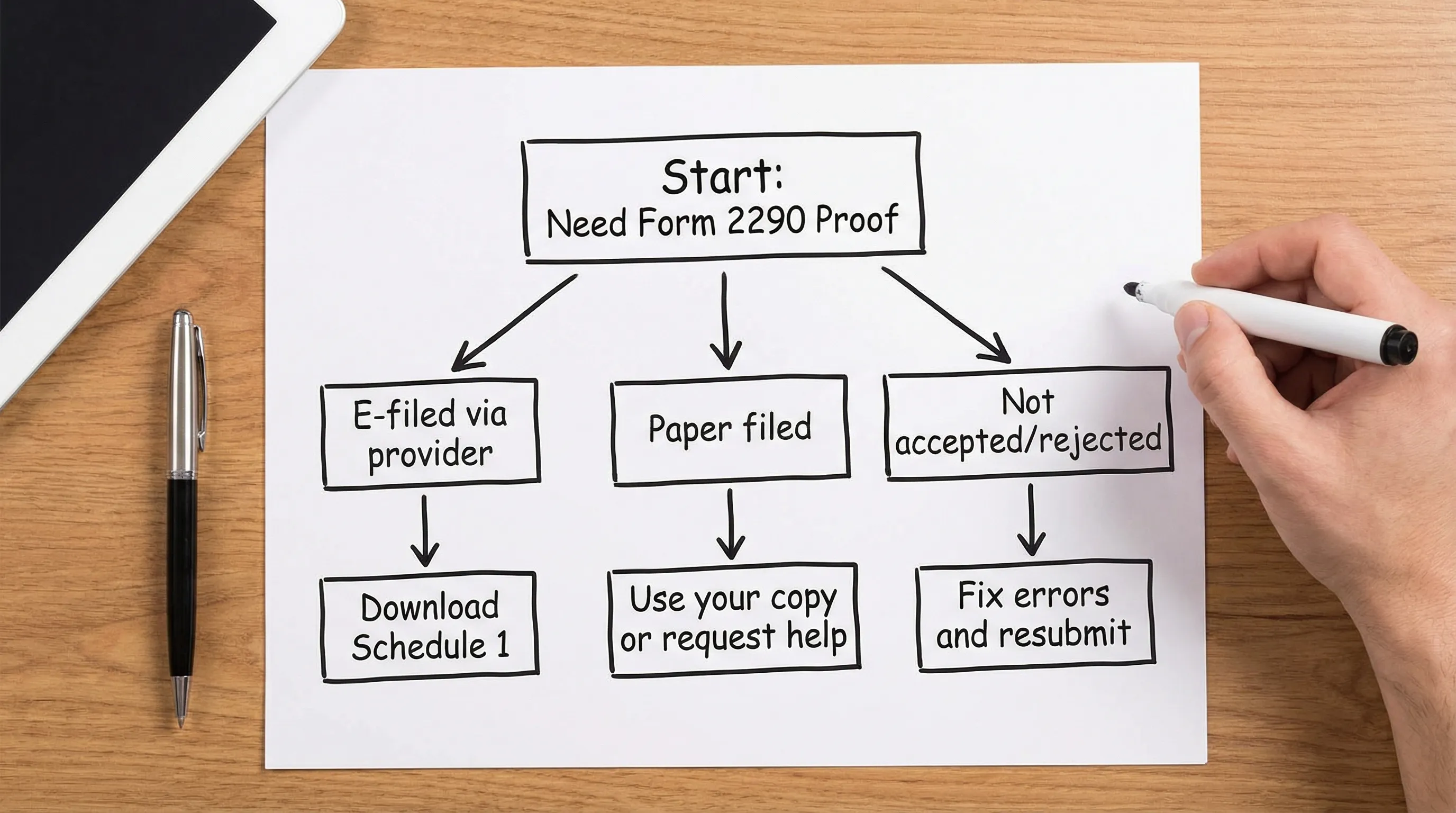
Retrieval speed matters, here’s the real-world timeline comparison
HVUT season is highly time-sensitive (especially around summer renewals). Your best move is to pick the fastest valid retrieval option based on how you filed.
| Situation | Best place to get your copy | What you’ll usually get fastest | Practical timeline to have it in hand |
|---|---|---|---|
| You e-filed through an IRS Authorized E-file Provider | Your provider account (dashboard/email) | Stamped **Form 2290 Schedule 1** PDF | Often minutes after IRS acceptance |
| You paper-filed and lost your records | Your mailed records first, then IRS support | Replacement guidance, status help, sometimes reissuance options | Often days to weeks depending on case |
| Return was rejected or never accepted | Your e-file provider (or tax pro) | Corrected filing and new Schedule 1 | Same day once corrected |
| You need proof for **2290 Schedule 1 for IRP** right now | E-file (if not yet accepted) or download from provider | Stamped Schedule 1 | Minutes after acceptance (e-file) |
A quick “time-to-proof” chart (typical)
| Method | Typical time-to-proof |
|---|---|
| E-file + download from provider | Minutes to hours |
| Provider support re-sends Schedule 1 | Same day (often) |
| Paper filing processing and mail handling | Often several weeks (varies by season) |
The IRS itself also requires e-filing in certain cases. For example, the Form 2290 instructions state that you must e-file if you are filing for 25 or more vehicles, which is one reason many fleets default to electronic filing and digital retrieval. See the official IRS instructions here: Instructions for Form 2290 (IRS).
If you e-filed: the simplest way to get a copy is to re-download your Schedule 1
If you filed electronically, the fastest answer to “how to get a copy of my IRS 2290 form” is usually: log in where you filed and download it again.
What to do (especially if you used Simple Form 2290)
If you filed with Simple Form 2290, your documents are typically available from your account because the platform is designed for secure data retrieval and repeat access (helpful when IRP asks again later).
To pull your copy quickly, have these details ready:
- Your EIN (business tax ID)
- The tax year and First Used Month (FUM) you filed for
- The truck’s VIN (common when you’re searching across multiple vehicles)
- The email address used to create your filing account
Then focus on retrieving the right artifact:
- For IRP/DMV: download the IRS-stamped Form 2290 Schedule 1
- For your records/bookkeeping: also download the filed Form 2290 copy and any payment confirmation
This is also where an “Easy 2290” workflow pays off strategically: the best filing experience is the one that makes retrieval painless at renewal time.
Common “e-file retrieval” problems that block IRP (and how to avoid them)
IRP offices and permit services usually reject paperwork for fixable reasons, not because you “don’t have the form.” The biggest issues:
- VIN mismatch: one digit off means the Schedule 1 does not validate for that truck
- Wrong tax period: you printed last year’s Schedule 1
- Not actually accepted: you saved a draft or pending copy instead of the IRS-stamped Schedule 1
If you suspect acceptance is the issue, use a status workflow first. This guide can help: How to check 2290 filing status.
If you paper-filed: your “copy” depends on what you saved, not what the IRS stored
When you paper-file, you should have kept:
- A photocopy/PDF of the Form 2290 you mailed
- Proof of mailing (if you sent it with tracking)
- The stamped Schedule 1 you received back
If you lost your paperwork, the recovery path is slower because you are relying on mail processing and support queues.
The fastest move for paper filers: find any of these first
Before you call anyone, search:
- Your sent mail folder (if you scanned it)
- Your glovebox binder or permit binder
- Your tax preparer’s portal (if a service filed for you)
- Your bank records (payment trail can help support locate the filing)
If you need help from the IRS
For Form 2290/HVUT issues, the IRS has an excise tax help desk. Your call goes faster if you have:
- EIN
- VIN
- Tax period/FUM
- Any IRS notices you received
For official contact options, you can also reference: IRS Customer Support Phone Numbers.
If you need Spanish-language support, ask specifically for Spanish assistance when you contact the IRS (many IRS phone systems and services offer language options), and consider using an e-file provider that offers bilingual support so you are not forced into back-and-forth calls.
If your goal is IRP truck registration: treat Schedule 1 like a time-sensitive compliance asset
A useful way to think about Schedule 1 is that it’s not “tax paperwork,” it’s an operational credential.
Lessons learned from renewals (what experienced fleets do differently)
Here are patterns that separate smooth renewals from last-minute fire drills (especially for Form 2290 and IRP registration):
- They store Schedule 1 by VIN, not by truck nickname. IRP cares about the VIN.
- They maintain a “renewal-ready” folder. One place where the current year’s Schedule 1 PDFs live.
- They verify acceptance immediately. If a return is rejected, they fix it the same day.
A practical recordkeeping template (steal this)
Use a naming system that makes it hard to grab the wrong year.
| Document type | File naming example | Why it works |
|---|---|---|
| Schedule 1 (stamped proof) | `2025-2026_2290_Schedule1_VIN-1234.pdf` | VIN and tax year are visible instantly |
| Filed Form 2290 copy | `2025-2026_Form2290_Return.pdf` | Helps with accounting and audits |
| Payment proof | `2025-2026_2290_Payment_Confirmation.pdf` | Useful if proof is questioned |
This small habit reduces the most common IRP delay: showing up with a valid Schedule 1, but for the wrong tax year.
Strategic comparison: DIY IRS chasing vs. using a provider that stores your filings
First-time filers often underestimate the lifetime cost of “cheap filing” if it creates retrieval problems later.
Here’s the strategic comparison to keep in mind:
- Paper filing: you control the paper trail, but you also carry all retrieval risk. If you misplace it, you may spend hours recovering it.
- Electronic file Form 2290 and pay online: you reduce processing friction and usually gain instant access to stamped proof.
- IRS Authorized E-file Provider (like Simple Form 2290): you typically gain guided filing, validation checks, and account-based document retrieval, which is exactly what you need when IRP asks for proof again.
If you are actively trying to choose the cheapest 2290 e file option, make sure you compare not only the filing fee, but also:
- How fast you can re-download Schedule 1
- Whether support can resend documents quickly
- Whether bulk filings and multi-vehicle retrieval are easy
Those differences show up later, at renewal time, not on filing day.
When you should contact your e-file provider instead of the IRS
A simple rule: if the issue is about your submission, acceptance, or retrieving your Schedule 1, your provider is often the fastest path.
Contact your provider first when:
- You need a re-send of a stamped Schedule 1
- Your filing shows “rejected/pending” and you want to fix it
- You need a VIN correction or amendment workflow
If you filed with Simple Form 2290, provider support can typically walk you through retrieval and next steps without you waiting in a federal phone queue.
Bottom line: the fastest copy is the one you can retrieve by VIN in seconds
If you remember one thing, make it this: for IRP and most real-world compliance scenarios, you’re not hunting for “the 2290,” you’re hunting for the IRS-stamped Form 2290 Schedule 1 tied to the correct vehicle identification number and tax year.
If you e-filed, log in and download it again. If you paper-filed, start with your own saved copy, then escalate with the right identifiers (EIN, VIN, tax period).
And if you want future renewals to be less stressful, consider filing through an IRS Authorized E-file Provider like Simple Form 2290, where your documents are built to be retrieved when you actually need them, not just filed once and forgotten.
Our services are also available for E-File Florida Form 2290 Online, Form 2290 Texas, Form 2290 California, Form 2290 in Illinois, File Form 2290 in Georgia, File Form 2290 in Tennessee and File Form 2290 in Pennsylvania .